Home
Home
Last updated: 23 October 2026
The best HR software for a Singapore SME depends on the work it needs to handle. Payroll, leave, claims and employee records are common starting points. Businesses managing shifts, multiple locations or project workers may also need connected attendance, rostering and labour-cost reporting.
OpensoftHR, Info-Tech, QuickHR, JustLogin, Talenox and Swingvy are six options worth considering. To build a useful shortlist, compare the workflows you need, the complete package cost, implementation requirements and ongoing support.
This guide explains what each platform offers, how OpensoftHR’s three pricing options work, and what to test before choosing a system.
Editorial disclosure: This guide is published by OpensoftHR. It compares publicly documented capabilities reviewed on 23 October 2026, rather than hands-on testing of every platform. Recommendations about business fit are our assessment. Features, pricing and package inclusions can change.
HR software in Singapore: comparison at a glance
The platforms below are listed as shortlist options, rather than a ranked league table. A capability being available does not mean it is included in every package.
| Platform | Consider it when you need | Capabilities to evaluate | Pricing route |
|---|---|---|---|
| OpensoftHR | Everyday HR with options for attendance, shifts and project labour costing | Payroll, leave, claims, attendance, rostering, employee records, job costing and AIME | SaaS Starter calculator; published Enterprise packages; customised Premium pricing |
| Info-Tech | A broad HR suite, including attendance and project costing | Payroll, leave, expense claims, attendance, appraisal and project costing | Request a quotation for your required package |
| QuickHR | Packaged HR options with additional workforce and talent functions | Payroll, leave, claims, timesheets, attendance and higher-tier roster and talent functions | Essentials, Enhanced and Enterprise plans; confirm current rates and one-time fees |
| JustLogin | Core HR alongside broader employee processes and AI assistance | Payroll, leave, attendance, expenses, recruitment, appraisal and Justina AI assistant | Confirm pricing for the required modules and services |
| Talenox | A payroll-and-leave starting point with employee records and claims capabilities to explore | Profiles, payroll, leave and claims | Published Singapore pricing, with application and suite options |
| Swingvy | Modular HR and payroll with mobile employee access | HR Hub, leave, claims, payroll and mobile access | Published component pricing; confirm combined cost and setup fees |
Sources: OpensoftHR, Info-Tech: https://www.info-tech.com.sg/faq, QuickHR: https://quickhr.co/resources/faqs, JustLogin: https://justlogin.com/, Talenox: https://www.talenox.com/ and Swingvy: https://www.swingvy.com/sg/pricing.
How to choose HR software for your SME
Start with the three tasks that consume the most HR time. These might be checking attendance records, re-entering approved claims into payroll or answering repeated leave enquiries.
Use those tasks to assess five areas:
- Required functions. Which payroll, leave, claims, attendance and employee-record processes must the system handle?
- Workforce fit. Can it support your locations, employee groups, shifts and approval rules?
- Connected workflows. Which steps happen automatically, and which still require imports or repeated entry?
- Implementation and support. Who prepares the data, configures policies, trains users and resolves problems?
- Total cost. What are the implementation charges, recurring fees and costs of adding functions later?
Give each shortlisted vendor the same scenarios. A demonstration using your actual requirements is more informative than a generic tour of every feature.
OpensoftHR: connected HR with three pricing options
OpensoftHR combines payroll, leave, claims, attendance, rostering and employee management. Businesses needing project-level labour reporting can also evaluate its job-costing functionality.
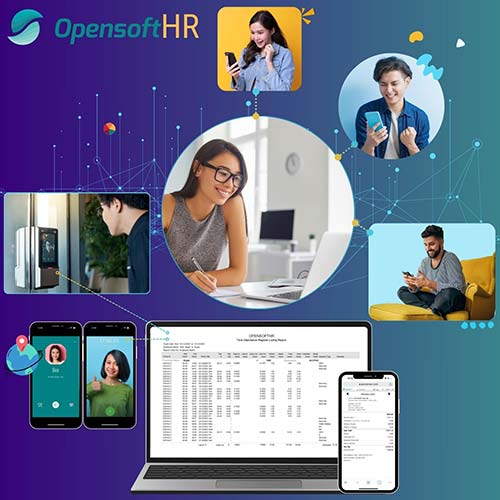
Its AIME employee self-service assistant supports conversational leave applications, receipt-based claim submissions and GPS-enabled attendance. Ask to see the employee request, approval and resulting system record together.
Consider OpensoftHR if: You want connected everyday HR, with the option to address more complex attendance, shift or project requirements. Small companies can begin by checking SaaS Starter, while businesses needing broader implementation services or customisation can assess Enterprise or Premium.
What to test: Show how approved leave, claims and attendance affect payroll. If you allocate labour to projects, ask for a demonstration of one employee working across two projects in the same pay period.
OpensoftHR pricing: SaaS Starter, Enterprise and Premium
OpensoftHR has three pricing options. Compare the relevant package scope rather than applying one starting price to the entire product range.
| Option | How to assess pricing |
|---|---|
| SaaS Starter | Designed for companies with 10–25 employees. Select modules and headcount using the online pricing calculator. |
| Enterprise | EDGE grant-eligible packages, subject to the applicant, package and applicable conditions. Review published packages on the SMEs Go Digital listing. |
| Premium | Customised requirements, with pricing based on the agreed scope. Discuss workflows, integrations and implementation needs with OpensoftHR. |
The SMEs Go Digital listing reviewed for this guide shows Enterprise at S$4,700 before grant, with an estimated grant of S$2,350, and Enterprise + Attendance at S$5,900 before grant, with an estimated grant of S$2,950.
These listed amounts cover a one-year Enterprise package. Maintenance fees apply; details are available during a consultation. Grant support is subject to eligibility and approval. Refer to the current listing and quotation for package inclusions and applicable GST.
Customer example: connecting HR records to payroll
Gold Plus Construction illustrates the practical value of connected HR records. In its published testimonial, Amily Chew describes leave, claims and attendance information flowing into OpensoftHR payroll, including unpaid leave, claims and overtime hours.
She reports time savings and fewer errors associated with manual processing. This is an individual customer’s reported experience, rather than a measured result promised to every business.
The useful question for your own evaluation is whether approved HR information can reach payroll without someone entering it again.
Read Gold Plus Construction’s testimonial.
Info-Tech: a broad HR application suite
Info-Tech lists payroll, time attendance, leave, expense claims, appraisal and project costing among its applications. That makes it relevant to businesses evaluating several operational requirements together. Source: Info-Tech FAQs: https://www.info-tech.com.sg/faq.
Consider it if: You want to assess a broad HR suite, including attendance and project-costing workflows.
What to test: Ask how employees are assigned to projects, how hours are approved and how the resulting costs appear in reports. Confirm which applications and services are included in the quotation.
Pricing: Request an itemised quote for your headcount, required applications, implementation and support. Compare it against the same scope requested from other vendors.
QuickHR: packaged HR with additional workforce functions
QuickHR describes Essentials, Enhanced and Enterprise plans. Its FAQ lists core payroll, leave and claims functions, with roster, attendance, integrations and additional talent functions across higher plans. It also documents biometric-device and kiosk integration. Source: QuickHR FAQs: https://quickhr.co/resources/faqs.
Consider it if: You prefer to evaluate defined packages and identify the level that covers your requirements.
What to test: Establish which plan includes every function you need. Demonstrate a roster change, attendance correction and the resulting payroll workflow together.
Pricing: Confirm current subscription rates and one-time charges. QuickHR’s FAQ identifies setup, training and migration fees, so include those in the first-year comparison.
JustLogin: core HR with wider employee processes
JustLogin advertises payroll, leave, attendance, expenses and employee records alongside recruitment, appraisal and onboarding. Its Justina assistant supports employee enquiries, and its attendance offering includes GPS and facial-recognition options. Source: JustLogin: https://justlogin.com/.
Consider it if: You need to compare core administration alongside broader employee processes and AI assistance.
What to test: Ask the assistant to handle the questions your staff actually raise. Check access permissions, approval steps and how relevant records connect to payroll.
Pricing: Confirm the quoted modules, integrations and implementation services. Establish which advertised capabilities are included in your proposed package.
Talenox: payroll, leave and employee records
Talenox lists profiles, payroll, leave and claims on its website. Its Singapore pricing guide describes individual payroll or leave applications and a combined suite, with employee charging rules that distinguish full-time and daily or hourly rated part-time staff. Sources: Talenox: https://www.talenox.com/ and Singapore pricing guide: https://help.talenox.com/en/articles/8679724-pricing-plans-for-singapore.
Consider it if: Payroll and leave are your immediate priorities and you want to compare a focused starting scope.
What to test: Use your actual employee categories, pay adjustments and leave policies. If attendance or rostering is essential, confirm how those requirements would be handled and what additional tools are needed.
Pricing: Calculate costs using your employee mix and selected applications. Confirm current claims availability and pricing rather than assuming every advertised application is included in a suite.
Swingvy: modular HR and payroll
Swingvy’s pricing page lists an HR package covering HR Hub, leave and claims, with payroll as an additional component. It distinguishes monthly and annual billing, specifies a five-user starting point and notes a one-time account setup fee. Source: Swingvy pricing: https://www.swingvy.com/sg/pricing.
Consider it if: You want modular HR and payroll with mobile employee access.
What to test: Demonstrate how approved leave and claims affect payroll. If time tracking is essential, confirm its current availability and the configuration being proposed.
Pricing: Add together the required components, minimum charges and setup fee. A displayed price for one component is not the cost of the full HR-and-payroll combination.
Match the shortlist to your workforce
Mainly office-based teams
Prioritise payroll, leave, claims, employee records and approval routing. Test whether employees can complete common requests themselves and whether HR can review exceptions without maintaining a second spreadsheet.
If you use accounting software, check the actual export or integration process, including who reconciles the data.
Shift-based and multi-site teams
Make attendance and rostering central to the demonstration. Use an overnight shift, a missed clock-in and a supervisor correction as test cases.
Confirm the supported devices or mobile attendance methods, the process when connectivity fails, and how approved hours reach payroll. Ask who installs, maintains and supports any equipment.
Project-based businesses
Ask how labour hours and costs are allocated when employees move between jobs. Inspect the resulting project report and check which pay components it includes.
Several vendors advertise project-related capabilities. Compare the workflow and reporting depth rather than assuming that the same feature label means the same result.
Compare the complete cost of HR software
Request quotations using one shared requirements list. Separate:
- Subscription fees, minimum headcount and module charges.
- Setup, policy configuration and data migration.
- Administrator and employee training.
- Attendance equipment, installation and maintenance.
- Integrations, custom reports and additional services.
- Support arrangements and renewal terms.
Compare first-year expenditure and recurring costs separately. Keep package prices and monthly subscription rates clearly labelled, and compare costs before grants before considering any approved support.
For OpensoftHR, start with the SaaS Starter calculator if its scope fits your business. Review the published Enterprise packages if you need that option, or request a Premium discussion for customised requirements.
Five questions to ask before signing
- Can you demonstrate our real workflow? Give the vendor representative examples of your payroll inputs, approvals and reports.
- What remains manual? Identify imports, spreadsheets, repeated entry and exception handling.
- Who owns migration and sign-off? Agree responsibility for source data, opening balances, checks and any parallel payroll run.
- How does support work? Confirm contact channels, service hours, escalation and any chargeable assistance.
- What exactly are we buying? Obtain the modules, services, exclusions, contract period and renewal terms in writing.
Frequently asked questions
What is the best HR software for SMEs in Singapore?
The best fit is the platform that supports your required workflows at an acceptable total cost, with implementation and support suited to your team. OpensoftHR, Info-Tech, QuickHR, JustLogin, Talenox and Swingvy are six options to assess against a consistent requirements list.
What is the difference between payroll software and an HRMS?
Payroll software focuses on calculating and processing pay. An HRMS typically covers a wider range of functions, such as employee records, leave, claims and attendance. Exact coverage depends on the product and package.
Does OpensoftHR publish its pricing?
Yes. Companies with 10–25 employees can use the SaaS Starter calculator. Enterprise package pricing is listed on SMEs Go Digital. Premium pricing depends on customised requirements.
Is OpensoftHR Enterprise eligible for EDGE grant support?
OpensoftHR offers EDGE grant-eligible Enterprise packages. Actual eligibility, approved support and qualifying costs depend on the applicable conditions. Check the current listing and confirm your position before committing.
Can we retain our attendance devices?
This depends on compatibility and integration requirements. Provide the vendor with the make and model, then request confirmation of the supported connection and any additional costs.
How should we evaluate an AI HR assistant?
Test the tasks employees need to complete. Check the information it can access, whether it submits requests or only answers questions, how approvals work, and whether permissions match employee roles.
Find the right OpensoftHR option
If you have 10–25 employees, calculate your SaaS Starter price.
For Enterprise, review the published packages on SMEs Go Digital.
If you need help choosing a package or have customised requirements, tell us your headcount, locations and required functions. We can walk through the relevant workflows and explain what is included.